
OpenAI's Dots vs. Meta's Muse in under 17 minutes
The video weighs OpenAI's Dots against Meta's Muse as two persistent AI assistant agents, walking through pricing, underlying models, and ecosystem integrations to help viewers pick one. The comparison turns on the models each runs (Dots on GPT-6 Astra, Muse on Muse Spark 1.3), how each ties into other tools (Dots into ChatGPT, Codex, and Slack, versus Muse into WhatsApp and the Meta ecosystem), and how polished each launch felt, with the creator calling Dots a rushed catch up plagued by bugs and a failed on stage demo, while praising Muse's interface. The creator does not pick one universal winner, saying it depends on which ecosystem someone is already in: those living in ChatGPT and Codex would lean toward Dots, while those in the Instagram and Facebook ecosystem, or casual users who are not deep into AI, would prefer Muse's simpler interface.
Options: ChatGPT's persistent agent is called Dots. [00:19]
- Options: Meta's persistent agent is called Muse, which quickly became the number one app in the Apple App Store. [00:13]
- Criteria: The on-screen comparison table for Dots vs Muse covers background work, main model, existing work setup, deliverables, memory, communication, and standout ecosystem. [00:08]
- Main model: Dots runs on GPT-6 Astra while Muse runs on Muse Spark 1.3. [01:48]
- Benchmark: Astra scores 53 on the Overall Intelligence Index versus Spark 1.3's 48. [07:38]
+ 57 more takeaways
- Benchmark: Astra generates output at 51 tokens per second versus Spark 1.3's 184 tokens per second. [07:38]
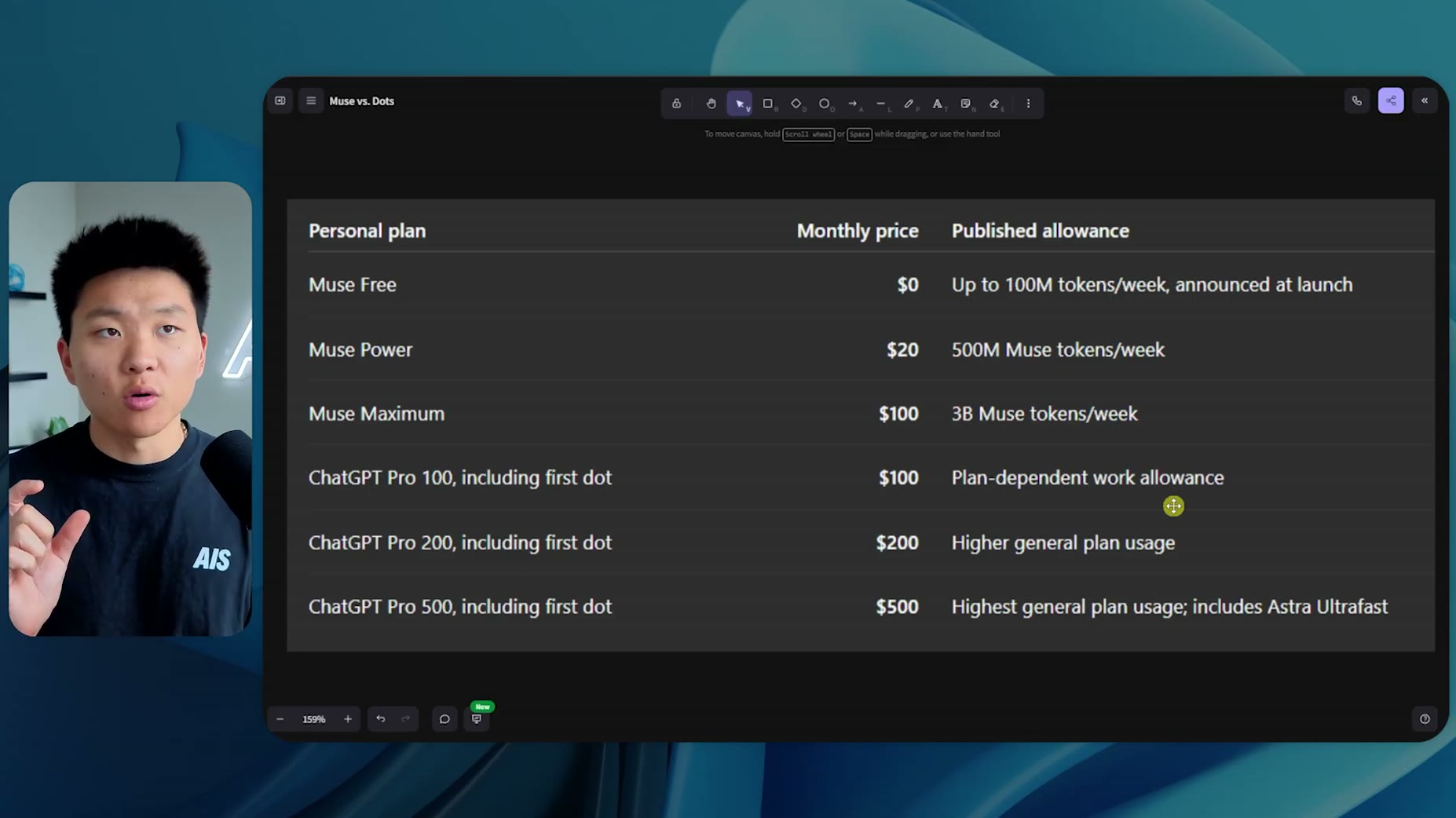
- Pricing: Muse Free is $0 for up to 100 million tokens a week. [00:07]
- Pricing: Muse Power is $20 a month for 500 million Muse tokens a week. [00:07]
- Pricing: Muse Maximum is $100 a month for 3 billion Muse tokens a week. [00:07]
- Pricing: ChatGPT Pro 100 is $100 a month. [00:07]
- Pricing: ChatGPT Pro 200 is $200 a month. [00:07]
- Pricing: ChatGPT Pro 500 is $500 a month, described as the highest general plan usage and including 'Astra Ultrafast'. [00:07]
- Pricing: The presenter separately lists ChatGPT Pro tiers tied to Dots access at $20 for 100 dots and $200 for 500 dots, plus additional tiers including the first dot. [07:00]
- Access: You must be on a paid ChatGPT subscription to build your first Dot. [07:10]
- Billing: Dot usage is not currently counted against the weekly ChatGPT subscription limit, though the presenter expects that to change as adoption builds. [07:17]
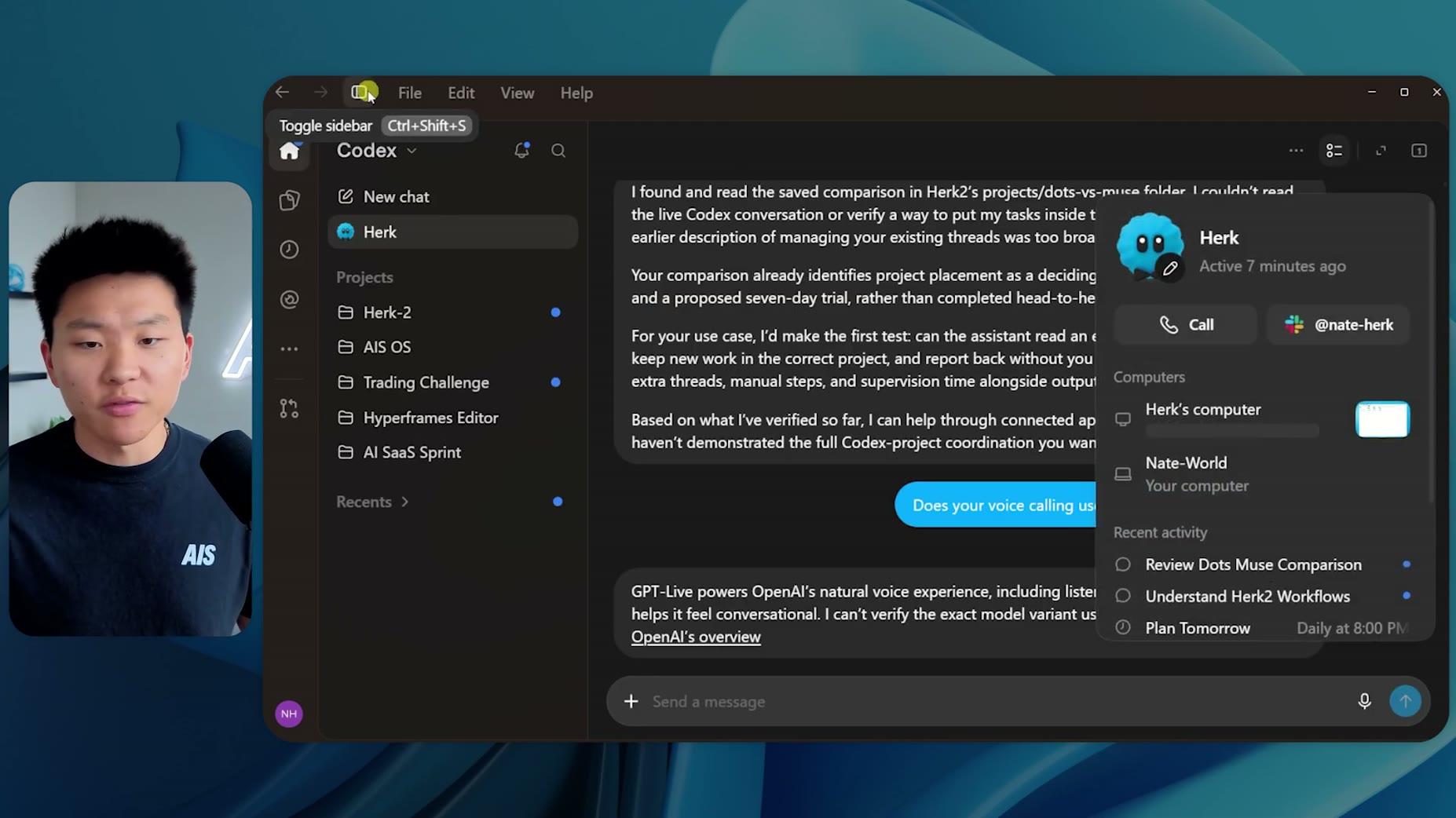
- Setup: Dots has a direct connection to ChatGPT work and Codex if you have the desktop app and allow access. [01:57]
- Setup: Muse has its own computer and tools. [02:06]
- Ecosystem: Both Muse and Dots have a strong connector ecosystem. [02:06]
- Communication: Dots can be instantly integrated into Slack in a three click setup. [04:44]
- Communication: A Dot can be invited into a Slack channel so a team can message it directly, not just one on one. [05:01]
- Communication: Dots is already integrated into Codex and ChatGPT. [05:57]
- Communication: Muse has a native WhatsApp connector alongside a main chat and separate side chats for different topics. [05:24]
- Communication: On the Muse app, WhatsApp messages are view only, so replying must be done from WhatsApp on desktop or phone. [05:34]
- Communication: Muse has ecosystem integration with what the presenter calls the meta ecosystem. [05:57]
- Shared: Both Dots and Muse let the user name and customize their personal assistant. [01:05]
- Shared: The presenter expected Dots to work like GrokBot with multiple bots talking to each other, but found it is one single thread or agent, similar to Muse. [01:17]
- Shared: Both Dots and Muse are persistent cloud agents with their own cloud computer and support scheduling. [01:48]
- Shared: Both use simple single sign on connections instead of requiring manual API keys. [02:11]
- Shared: Because both have their own computers, they can still run scripts and connect to APIs without a native connector. [02:18]
- Deliverables: Both Muse and Dots can create documents, presentations, and interactive dashboards and keep them in the ecosystem. [02:24]
- Memory: The presenter's Dots assistant pulled old ChatGPT memory noting they run a business and use n8n daily. [02:53]
- Memory: In Muse, named Charlie in this example, an identity tab shows a soul file and memory file, which is more visual than Dots' more abstract memory handling. [03:12]
- Muse feature: Muse has an approvals tab, a schedule tab showing reminders and running tasks, and a heartbeat that runs every 30 minutes. [08:39]
- Muse feature: The heartbeat proactively scans Google Docs and email and gives alerts. [08:54]
- Muse feature: Users can search across multiple chats from the left-hand side. [09:10]
- Muse feature: Chats can be managed in one place, avoiding the need to build many separate bots. [09:19]
- Muse feature: Users can create side chats for specific projects instead of many bots. [09:24]
- Muse feature: Inside Muse you create one thread or bot, unlike GrokBot where you can keep creating more bots. [08:26]
- Muse feature: Users can set goals such as sleep optimization, health, relationship, career, and interest. [09:45]
- Muse feature: Users can turn a feed like Daily Tech News into a short morning podcast or a weekly team recap podcast. [10:37]
- Context: GrokBot uses a bunch of separate bots organized together rather than the single thread that Dots and Muse each use. [14:42]
- Weakness (Dots): The speaker calls Dots a rushed project built to catch up after seeing Muse take over. [00:27]
- Weakness (Dots): During Dev Day, the Dots demo failed on stage and the presenter could not get it to respond. [00:42]
- Weakness (Dots): A journalist's post described Dots failing during its first live demo at DevDay, with the team muting it on the livestream while the in-person audience saw the failure. [00:53]
- Weakness (Dots): Herk directed the user to a nonexistent 'scheduled' menu under profile; scheduled tasks are instead found by navigating like Codex or ChatGPT scheduled tasks. [11:53]
- Weakness (Dots): New threads kicked off by Dots land in 'Recents' instead of inside the user's dedicated project. [12:17]
- Weakness (Dots): Herk claimed to be good at managing the user's Codex threads, but the presenter says it actually doesn't do that well. [12:07]
- Weakness (Dots): The presenter states plainly that 'Dots doesn't even know how it works.' [12:38]
- Weakness (Dots): The presenter likes asking Claude Code, Codex, or GrokBot how they work, but says Dots gives inaccurate answers about its own behavior. [12:40]
- Weakness (Dots): The narrator tweeted that Dots should have been called 'bugs' due to how many issues he had. [15:23]
- Weakness (Dots): He was frustrated the day before making the video because nothing was working, including on his phone and desktop app. [15:27]
- Weakness (Dots): The narrator is disappointed Dots feels rushed, calling it a 'catch up' play. [15:07]
- Strength (Dots): The narrator says if he had to choose one platform he would choose Codex and Dots since he already lives inside Codex and Claude Code. [13:05]
- Strength (Dots): The narrator states Astra is a much better model than Muse Spark. [14:35]
- Strength (Muse): The narrator says Muse's interface is so much better and that this advantage is meaningful. [13:28]
- Best for: The narrator predicts the average user who is not deep into AI will prefer the simpler interface of Muse and Dots. [14:52]
- Best for: The creator says the choice depends on whether someone is already ingrained in the ChatGPT/Codex ecosystem versus the Instagram/Facebook ecosystem. [15:51]
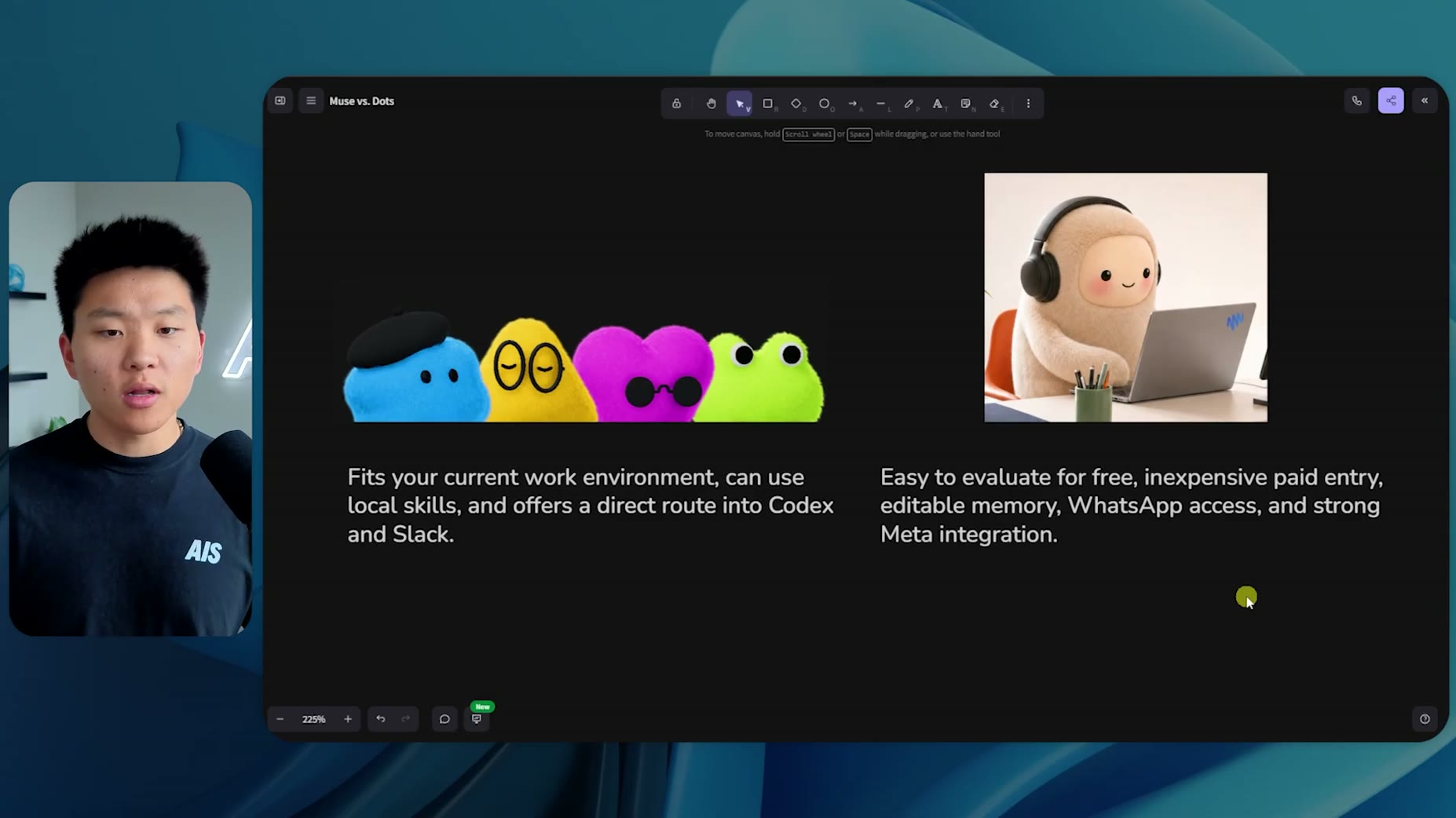
- It depends: The presenter's overall summary is that Dots fits your current work environment with local skills and a direct route into Codex and Slack, while Muse is easy to evaluate for free, has inexpensive paid entry, editable memory, WhatsApp access, and strong Meta integration. [06:24]
- On-screen comparison details unavailable: A whiteboard titled 'Muse vs. Dots' displayed an eight-row feature comparison table, but the specific row contents were not captured. [15:51]
- Wishlist: The speaker poses a choice between talking to the assistant via WhatsApp versus having it in Slack with a team. [15:59]
- Wishlist: Having the team talk to the speaker's Codex in Slack is described as cool functionality. [16:03]
- Wishlist: Being able to assign Codex tasks from Slack and have results sent back into Slack is highlighted as a desired feature. [16:10]
Make me a feed about my interests. Keep the tone clear and direct. Ensure it is quick to skim. Try to avoid clickbait.
I want to create Charlie [...] that helps me track OpenAI versus Anthropic, understanding their recent releases, understanding their plan for IpO, understanding things like their reported revenue and usage numbers, what are their constraints help me build something that's easy to understand at a glance.
How this brief was shaped: Comparison / Buyer Guide · confidence High
Transcript opens with the creator explicitly stating the video compares OpenAI's Dots and Meta's Muse on features, functionality, feel, and pricing, then discusses where these apps are headed. OCR shows a financial PDF on OpenAI burn rate and valuation, likely cited as evidence for the 'where these are headed' prediction rather than a separate topic.
The lens sets this brief's structure, never its facts — every claim is held to the same citation and fact-check standard.